AreaCalc GPS Free
$0
Free forever
Everything you need to measure. No account needed

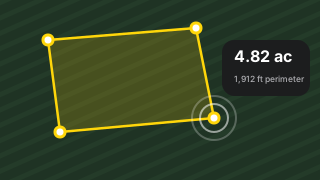
Measure any field, lot or yard in seconds. Tap the corners on a satellite map, or walk the edge with GPS.
For iPhone and iPad. Android coming soon.
Start free to try it out. Go Pro whenever you need more.
$0
Free forever
Everything you need to measure. No account needed
$7.99/month
or $59.99/year Save 37%
Through the App Store. Cancel any time
Prices in US dollars. The App Store shows the price in your country’s currency.
Measuring a field takes seconds. Here’s how.
Answers to common questions. Still stuck? Email us and we'll help.
Areas are calculated on the Earth's surface from the points you place, so they're as accurate as your points. On a clear satellite image, tapping corners is typically within a few feet. GPS recording depends on your phone's GPS, usually a few meters in open sky. AreaCalc is a measuring tool, not a legal survey.
Open AreaCalc, tap Go Pro, then Continue, then Restore purchases. Use the same Apple Account you bought Pro with. To get your saved measurements back too, sign in from the menu with your AreaCalc account.
Subscriptions are managed by Apple. On your iPhone or iPad, open Settings, tap your name, then Subscriptions, and choose AreaCalc GPS. You keep Pro until the end of the period you've paid for. Deleting the app or your account doesn't cancel it.
No. Measuring and saving work without one, and everything stays on your device. An account is for Pro subscribers who want their measurements backed up and synced across devices.
In the app, open the menu, then Account, then Delete account. This deletes your account and its cloud data. If you can't use the app, see deleting your account.
Only to show where you are on the map and to trace a boundary while you walk it. Location is used only while the app is open, never in the background. Drawing by hand works without it. See our privacy policy.
Contact support
Email [email protected]. Tell us your device, the app version
and what happened, and we'll get back to you.

